-
기초 코드3 - form태그웹 Web/HTML & CSS & Javascript 2022. 1. 12. 12:59
input type(text, radio) 활용하여 허접한 로그인화면 만들기
<input type="password"> -> obscure text
css <input type="radio" value = "css" name="rdo">
html <input type="radio" name="rdo"> 에서 name을 똑같이 설정해주어야 둘 중 하나만 선택할 수 있음checkbox는 서버가 배열로 받기 때문에 여러개 선택 가능
<input type="submit" value = "전송">을 통해 <form action="index.jsp">의 index.jsp로 이동
<!DOCTYPE html>
<html lang="en">
<head>
    <meta charset="UTF-8">
    <title>Document</title>
</head>
<body>
    <h1>login </h1>
    <form action="index.jsp">
        <label for="id">id</label>
        <input type="text"> <br>
        <label for="pw">pw</label>
        <input type="password"> <br>

        <h2>좋아하는 분야는?</h2>
        css <input type="radio" value = "css" name="rdo">
        html <input type="radio" name="rdo">
        jqeury <input type="radio" name="="rdo><br>

        <h2>당신의 취미는?</h2>
        <input type="checkbox"> 축구
        <input type="checkbox"> 농구
        <input type="checkbox"> 야구
        <input type="checkbox"> 족구
        <input type="checkbox"> 피구
        <input type="submit" value = "전송">
    </form>
    남기고 싶은 말 <br>
    <textarea name="ta" id="text" cols="30" rows="10"></textarea> <br>
    <button>전송</button>

</body>
</html>
Form태그 아주 중요
<!DOCTYPE html>
<html lang="en">
<head>
    <meta charset="UTF-8">
    <title>Document</title>
</head>
<body>
    <h1>login </h1>
    <form action="index.jsp">
        <label for="id">id</label>
        <input type="text"> <br>
        <label for="pw">pw</label>
        <input type="password"> <br>

        <h2>좋아하는 분야는?</h2>
        css <input type="radio" value = "css" name="rdo">
        html <input type="radio" name="rdo">
        jqeury <input type="radio" name="="rdo><br>

        <h2>당신의 취미는?</h2>
        <input type="checkbox"> 축구
        <input type="checkbox"> 농구
        <input type="checkbox"> 야구
        <input type="checkbox"> 족구
        <input type="checkbox"> 피구
        <input type="submit" value = "전송">
    </form>
    남기고 싶은 말 <br>
    <textarea name="ta" id="text" cols="30" rows="10"></textarea> <br>
    <button>전송</button>

</body>
</html>
input은 무조건 form태그 안에서만 사용이 가능하지만, textarea와 button은 form 밖에서도 사용이 가능하다
form 태그가 서블릿을 요청할 때는 get과 post 두가지 전송 방식 중 한가지로 전송된다. method 어트리뷰트를 <form>태스에 추가하여 개발자가 원하는 전송 방식을 결정할 수 있다. method 어트리뷰트 값으로 get을 기술하면 doGet()메소드가, post를 기술하면 doPost() 메소드가 호출된다
doGet (get방식) : 민감한 데이터를 넘김. url을 보여줌. 북마크가 필요한 경우 유용
doPost (post방식) : body 안에 넣음. url을 암호화시킴. 사이즈 무한대. 많은 양의 데이터 전송 가능
테이블에 폼 넣기
<!DOCTYPE html>
<html>
<head>
<meta charset="UTF-8">
<title>Form Elements</title>
<style>
	table{
		border: solid 1px;
		border-collapse: collapse;
	}
	th{
		background-color: skyblue;
		text-align: right;
	}
	#btn{
		background-color: skyblue;
		text-align: center;
	}
	#btn_submit{
		margin: 10px;
	}
</style>
</head>
<body>
<!-- 3x2 테이블에 폼 요소 넣기 -->
<h2>Table에 Form 넣기</h2>
<form action="">
	<table border=1>
		<tr>
			<th>ID</th>
			<td><input type="text"></td>
		</tr>
		<tr>
			<th>비밀번호 </th>
			<td><input type="password"></td>
		</tr>
		<tr>
			<th>사용언어</th>
			<td>
				<input type="checkbox">java
				<input type="checkbox">python
				<input type="checkbox">javascript
				<input type="checkbox">html
			</td>
		</tr>
		<tr>
			<th>사용IDE</th>
			<td>
				<input type="radio" name="ide">Eclipse
				<input type="radio" name="ide">IntelliJ
				<input type="radio" name="ide">VS Code
			</td>
		</tr>
		<tr>
			<th>Role</th>
			<td>
				<select>
					<option>--- 역할 ---
					<option>디자이너
					<option>프로그래머
					<option>설계
					<option>개발자
					<option>퍼블리셔
				</select>
			</td>
		</tr>
		<tr>
			<th>자기소개</th>
			<td><textarea cols="30" rows="5">자기소개를 입력하세요</textarea></td>
		</tr>
		<tr>
			<td id="btn" colspan="2">
				<input type="button" value="id체크">
				<input type="reset" value="새로고침">
				<input type="submit" id="btn_submit" value="제출">
			</td>
		</tr>
	</table>
</form>

</body>
</html>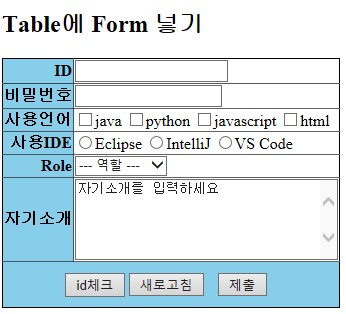
'웹 Web > HTML & CSS & Javascript' 카테고리의 다른 글
연도와 월 입력하여 달력 출력하기 (0) 2023.02.07 HTML파일에서 외부 CSS, JS파일 불러오기 (0) 2023.02.03 DOM, Document (0) 2023.02.02 기초 코드2 - 이미지, 링크 (0) 2022.01.12 브라켓 기본세팅 및 CSS 기초 코드 (0) 2022.01.12