-
DOM, Document웹 Web/HTML & CSS & Javascript 2023. 2. 2. 18:30
참고 교재 - 황기태<명품 웹프로그래밍>
HTML DOM 객체
브라우저가 HTML 페이지를 로드할 때 각각의 HTML 태그를 객체로 만든다.
HTML 태그의 콘텐츠와 출력 모양을 제어하기 위해 필요하다.
BOM 객체
브라우저에 관한 정보를 제공하고 모양을 제어하는 객체.
window, history, screen 객체 등이 있다.
자주 쓰는 Document 메소드 정리
getElementById 지정된 id를 가진 element를 가져온다. element가 없는 경우 null을 리턴.
getElementsByClassName 지정된 class를 가진 element를 가져온다.
innerHTML element 안의 html나 xml을 리턴
innerText element 안의 text값을 리턴
value text 필드의 value값을 설정하거나 반환.
화면에서 두 숫자 입력 받아 덧셈 출력
<!DOCTYPE html>
<html>
<head>
<meta charset="UTF-8">
<title>웹페이지 구성</title>
<script>
	function plus(){
		alert('문제 풀이 중...');

		let n1 = document.getElementById("n1");
		let n2 = document.getElementById("n2");
		// body의 num1과 num2를 가져와서 정수로 변환 후 덧셈하여 temp에 저장
		let temp = parseInt(n1.value) + parseInt(n2.value);

		// 위에서 덧셈한 temp값을 body의 result 위치에 출력되도록
		let result = document.getElementById("result");
		result.innerHTML = temp;
	}
</script>
</head>
<body>
<h2>문제1. 아래 덧셈을 하고 정답란에 정답을 출력하시오.</h2>

<input type="text" id="n1"> <span> + </span> <input type="text" id="n2">
<br><br>

<input type="button" value="정답보기" onclick="plus()">
<br><br><hr>
<h3>정답: </h3> <span id="result"></span>
</body>
</html>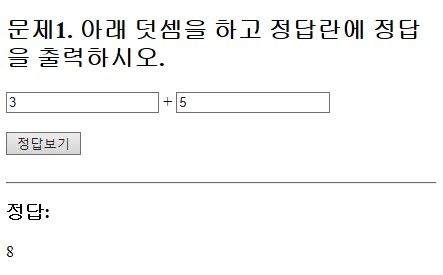
폼의 id 입력란이 비어있으면 경고 알림창 띄우기
<!DOCTYPE html>
<html>
<head>
<meta charset="UTF-8">
<title>Form Elements</title>
<style>
	table{
		border: solid 1px;
		border-collapse: collapse;
	}
	th{
		background-color: skyblue;
		text-align: right;
	}
	#btn{
		background-color: skyblue;
		text-align: center;
	}
	#btn_submit{
		margin: 10px;
	}
</style>
<script>
	function idCheck() {
		let userId = document.getElementById("userId").value;

		if(userId == '') {
			alert('id는 반드시 입력해야 합니다.');
		}
	}
</script>
</head>
<body>
<!-- 3x2 테이블에 폼 요소 넣기 -->
<h2>Table에 Form 넣기</h2>
<form action="">
	<table border=1>
		<tr>
			<th>ID</th>
			<td><input type="text" id="userId"></td>
		</tr>
		<tr>
			<th>비밀번호 </th>
			<td><input type="password"></td>
		</tr>
		<tr>
			<th>사용언어</th>
			<td>
				<input type="checkbox">java
				<input type="checkbox">python
				<input type="checkbox">javascript
				<input type="checkbox">html
			</td>
		</tr>
		<tr>
			<th>사용IDE</th>
			<td>
				<input type="radio" name="ide">Eclipse
				<input type="radio" name="ide">IntelliJ
				<input type="radio" name="ide">VS Code
			</td>
		</tr>
		<tr>
			<th>Role</th>
			<td>
				<select>
					<option>--- 역할 ---
					<option>디자이너
					<option>프로그래머
					<option>설계
					<option>개발자
					<option>퍼블리셔
				</select>
			</td>
		</tr>
		<tr>
			<th>자기소개</th>
			<td><textarea cols="30" rows="5">자기소개를 입력하세요</textarea></td>
		</tr>
		<tr>
			<td id="btn" colspan="2">
				<input type="button" value="id체크" onclick="idCheck()">
				<input type="reset" value="새로고침">
				<input type="submit" id="btn_submit" value="제출">
			</td>
		</tr>
	</table>
</form>

</body>
</html>
ID 미입력 및 비밀번호 불일치 메시지 출력
<!DOCTYPE html>
<html>
<head>
<meta charset="UTF-8">
<title>Form Elements</title>
<style>
	table{
		border: solid 1px;
		border-collapse: collapse;
	}
	th{
		background-color: skyblue;
		text-align: right;
	}
	#btn{
		background-color: skyblue;
		text-align: center;
	}
	#btn_submit{
		margin: 10px;
	}
	#idCheckMsg, #pwCheckMsg{
		color: red;
		font-weight: bold;
		font-size: 12px;
	}
</style>
<script>
	function idCheck() {
		let userId = document.getElementById("userId").value;

		if(userId == '') {
			let idCheckMsg = document.getElementById("idCheckMsg");
			idCheckMsg.innerHTML = 'ID는 반드시 입력해야 합니다.';
		}
	}
	function pwCheck(){
		let pw1 = document.getElementById("pw1");
		let pw2 = document.getElementById("pw2");

		if(pw1.value != pw2.value) {
			let pwCheckMsg = document.getElementById("pwCheckMsg");
			pw1.value = "";
			pw2.value = "";
			pwCheckMsg.innerHTML = '비밀번호가 일치하지 않습니다.';
		} else {
			pwCheckMsg.innerHTML = '';
		}
	}
</script>
</head>
<body>
<!-- 3x2 테이블에 폼 요소 넣기 -->
<h2>Table에 Form 넣기</h2>
<form action="">
	<table border=1>
		<tr>
			<th>ID </th>
			<td>
				<input type="text" id="userId">
				<input type="button" value="id체크" onclick="idCheck()">
				<span id="idCheckMsg"></span>
			</td>
		</tr>
		<tr>
			<th>비밀번호 </th>
			<td>
				<input type="password" id="pw1">
			</td>
		</tr>
		<tr>
			<th>비밀번호 확인</th>
			<td>
				<input type="password" id="pw2">
				<input type="button" value="비밀번호 체크" onclick="pwCheck()">
				<span id="pwCheckMsg"></span>
			</td>
		</tr>
		<tr>
			<th>사용언어</th>
			<td>
				<input type="checkbox">java
				<input type="checkbox">python
				<input type="checkbox">javascript
				<input type="checkbox">html
			</td>
		</tr>
		<tr>
			<th>사용IDE</th>
			<td>
				<input type="radio" name="ide">Eclipse
				<input type="radio" name="ide">IntelliJ
				<input type="radio" name="ide">VS Code
			</td>
		</tr>
		<tr>
			<th>Role</th>
			<td>
				<select>
					<option>--- 역할 ---
					<option>디자이너
					<option>프로그래머
					<option>설계
					<option>개발자
					<option>퍼블리셔
				</select>
			</td>
		</tr>
		<tr>
			<th>자기소개</th>
			<td><textarea cols="30" rows="5">자기소개를 입력하세요</textarea></td>
		</tr>
		<tr>
			<td id="btn" colspan="2">
				<input type="reset" value="새로고침">
				<input type="submit" id="btn_submit" value="제출">
			</td>
		</tr>
	</table>
</form>

</body>
</html>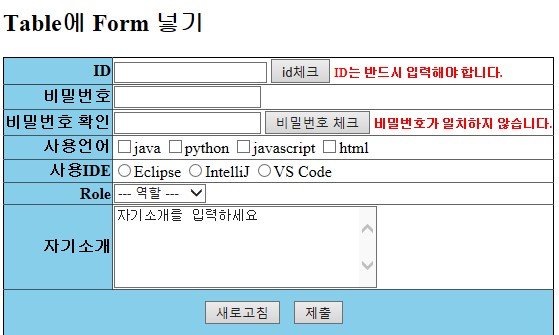
사용언어를 두개 이상 선택하도록 경고문구 표시
<!DOCTYPE html>
<html>
<head>
<meta charset="UTF-8">
<title>Form Elements</title>
<style>
	table{
		border: solid 1px;
		border-collapse: collapse;
	}
	th{
		background-color: skyblue;
		text-align: right;
	}
	#btn{
		background-color: skyblue;
		text-align: center;
	}
	#btn_submit{
		margin: 10px;
	}
	#idCheckMsg, #pwCheckMsg, #langCntMsg{
		color: red;
		font-weight: bold;
		font-size: 12px;
	}
</style>
<script>
	function idCheck() {
		let userId = document.getElementById("userId").value;

		if(userId == '') {
			let idCheckMsg = document.getElementById("idCheckMsg");
			idCheckMsg.innerHTML = 'ID는 반드시 입력해야 합니다.';
		}
	}
	function pwCheck(){
		let pw1 = document.getElementById("pw1");
		let pw2 = document.getElementById("pw2");

		if(pw1.value != pw2.value) {
			let pwCheckMsg = document.getElementById("pwCheckMsg");
			pw1.value = "";
			pw2.value = "";
			pwCheckMsg.innerHTML = '비밀번호가 일치하지 않습니다.';
		} else {
			pwCheckMsg.innerHTML = '';
		}
	}
	function checkCount() {
		// 배열 리턴
 		let langs = document.getElementsByClassName("lang");

		let count = 0;
 		for (let i = 0; i < langs.length; i++) {
			if(langs[i].checked) {
				count++;
			}
		}

 		if (count < 2) {
	 		let langCntMsg = document.getElementById("langCntMsg");
	 		langCntMsg.innerHTML = '2개 이상 선택하세요.';
 		} else {
 			langCntMsg.innerHTML = '';
 		}
	}


</script>
</head>
<body>
<!-- 3x2 테이블에 폼 요소 넣기 -->
<h2>Table에 Form 넣기</h2>
<form action="">
	<table border=1>
		<tr>
			<th>ID </th>
			<td>
				<input type="text" id="userId">
				<input type="button" value="id체크" onclick="idCheck()">
				<span id="idCheckMsg"></span>
			</td>
		</tr>
		<tr>
			<th>비밀번호 </th>
			<td>
				<input type="password" id="pw1">
			</td>
		</tr>
		<tr>
			<th>비밀번호 확인</th>
			<td>
				<input type="password" id="pw2">
				<input type="button" value="비밀번호 체크" onclick="pwCheck()">
				<span id="pwCheckMsg"></span>
			</td>
		</tr>
		<tr>
			<th>사용언어</th>
			<td>
				<input type="checkbox" class="lang" value="java" onclick="checkCount()">java
				<input type="checkbox" class="lang" value="python" onclick="checkCount()">python
				<input type="checkbox" class="lang" value="javascript" onclick="checkCount()">javascript
				<input type="checkbox" class="lang" value="html" onclick="checkCount()">html
				<span id="langCntMsg"></span>
			</td>
		</tr>
		<tr>
			<th>사용IDE</th>
			<td>
				<input type="radio" name="ide">Eclipse
				<input type="radio" name="ide">IntelliJ
				<input type="radio" name="ide">Visual Studio
				<input type="radio" name="ide">VS Code
			</td>
		</tr>
		<tr>
			<th>Role</th>
			<td>
				<select>
					<option>--- 역할 ---
					<option>디자이너
					<option>프로그래머
					<option>설계
					<option>개발자
					<option>퍼블리셔
				</select>
			</td>
		</tr>
		<tr>
			<th>자기소개</th>
			<td><textarea cols="30" rows="5">자기소개를 입력하세요</textarea></td>
		</tr>
		<tr>
			<td id="btn" colspan="2">
				<input type="reset" value="새로고침">
				<input type="submit" id="btn_submit" value="제출">
			</td>
		</tr>
	</table>
</form>

</body>
</html>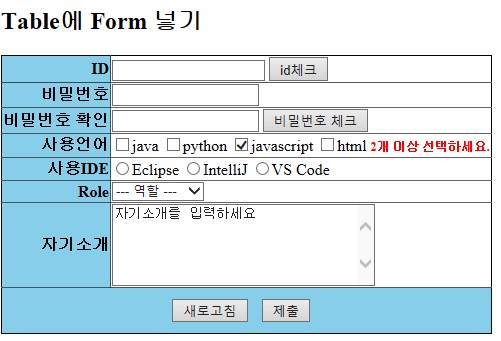
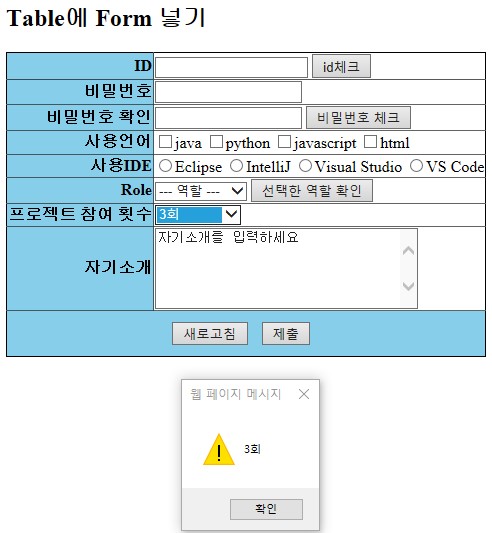
드롭박스에서 선택한 값을 경고창에 출력
<!DOCTYPE html>
<html>
<head>
<meta charset="UTF-8">
<title>Form Elements</title>
<style>
	table{
		border: solid 1px;
		border-collapse: collapse;
	}
	th{
		background-color: skyblue;
		text-align: right;
	}
	#btn{
		background-color: skyblue;
		text-align: center;
	}
	#btn_submit{
		margin: 10px;
	}
	#idCheckMsg, #pwCheckMsg, #langCntMsg{
		color: red;
		font-weight: bold;
		font-size: 12px;
	}
</style>
<script>
	function idCheck() {
		let userId = document.getElementById("userId").value;

		if(userId == '') {
			let idCheckMsg = document.getElementById("idCheckMsg");
			idCheckMsg.innerHTML = 'ID는 반드시 입력해야 합니다.';
		}
	}

	function pwCheck(){
		let pw1 = document.getElementById("pw1");
		let pw2 = document.getElementById("pw2");

		if(pw1.value != pw2.value) {
			let pwCheckMsg = document.getElementById("pwCheckMsg");
			pw1.value = "";
			pw2.value = "";
			pwCheckMsg.innerHTML = '비밀번호가 일치하지 않습니다.';
		} else {
			pwCheckMsg.innerHTML = '';
		}
	}

	function checkCount() {
		// 배열 리턴
 		let langs = document.getElementsByClassName("lang");

		let count = 0;
 		for (let i = 0; i < langs.length; i++) {
			if(langs[i].checked) {
				count++;
			}
		}

 		if (count < 2) {
	 		let langCntMsg = document.getElementById("langCntMsg");
	 		langCntMsg.innerHTML = '2개 이상 선택하세요.';
 		} else {
 			langCntMsg.innerHTML = '';
 		}
	}

	function selectedIde() {
		let ides = document.getElementsByName("ide");
		for (let i = 0; i < ides.length; i++) {
			if(ides[i].checked) {
				alert(ides[i].value);
			}
		}
	}

	function selectedRole() {
		let role = document.getElementById("role");
		alert(role.value);
	}

	function selectedPCount(element) {
		alert(element.value);
	}

</script>
</head>
<body>
<!-- 3x2 테이블에 폼 요소 넣기 -->
<h2>Table에 Form 넣기</h2>
<form action="">
	<table border=1>
		<tr>
			<th>ID </th>
			<td>
				<input type="text" id="userId">
				<input type="button" value="id체크" onclick="idCheck()">
				<span id="idCheckMsg"></span>
			</td>
		</tr>
		<tr>
			<th>비밀번호 </th>
			<td>
				<input type="password" id="pw1">
			</td>
		</tr>
		<tr>
			<th>비밀번호 확인</th>
			<td>
				<input type="password" id="pw2">
				<input type="button" value="비밀번호 체크" onclick="pwCheck()">
				<span id="pwCheckMsg"></span>
			</td>
		</tr>
		<tr>
			<th>사용언어</th>
			<td>
			<input type="checkbox" class="lang" onclick="checkCount()" value="java">java
			<input type="checkbox" class="lang" onclick="checkCount()" value="python">python
			<input type="checkbox" class="lang" onclick="checkCount()" value="javascript">javascript
			<input type="checkbox" class="lang" onclick="checkCount()" value="html">html
			<span id="langCntMsg"></span>
			</td>
		</tr>
		<tr>
			<th>사용IDE</th>
			<td>
			<input type="radio" name="ide" onclick="selectedIde()" value="Eclipse">Eclipse
			<input type="radio" name="ide" onclick="selectedIde()" value="IntelliJ">IntelliJ
			<input type="radio" name="ide" onclick="selectedIde()" value="Visual Studio">Visual Studio
			<input type="radio" name="ide" onclick="selectedIde()" value="VS Code">VS Code
			</td>
		</tr>
		<tr>
			<th>Role</th>
			<td>
				<select id="role">
					<option>--- 역할 ---
					<option value="디자이너">디자이너
					<option value="프로그래머">프로그래머
					<option value="설계">설계
					<option value="개발자">개발자
					<option value="퍼블리셔">퍼블리셔
				</select>
				<input type="button" value="선택한 역할 확인" onclick="selectedRole()">
			</td>
		</tr>
		<tr>
			<th>프로젝트 참여 횟수</th>
			<td>
				<select id="pCount" onchange="selectedPCount(this)">
					<option>--- 횟수 ---
					<option value="0회">0회
					<option value="1회">1회
					<option value="2회">2회
					<option value="3회">3회
					<option value="4회 이상">4회 이상
				</select>
			</td>
		</tr>
		<tr>
			<th>자기소개</th>
			<td><textarea cols="30" rows="5">자기소개를 입력하세요</textarea></td>
		</tr>
		<tr>
			<td id="btn" colspan="2">
				<input type="reset" value="새로고침">
				<input type="submit" id="btn_submit" value="제출">
			</td>
		</tr>
	</table>
</form>

</body>
</html>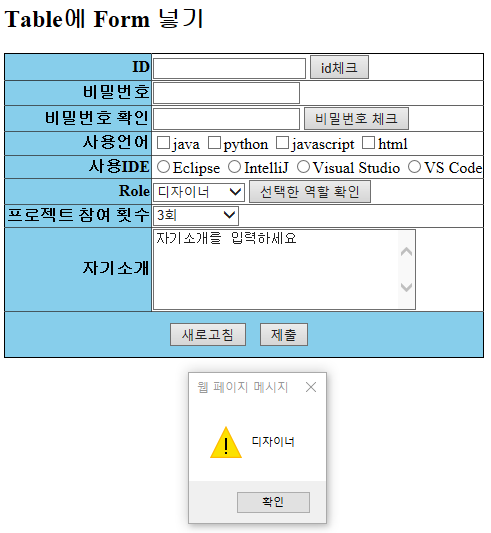
'웹 Web > HTML & CSS & Javascript' 카테고리의 다른 글
연도와 월 입력하여 달력 출력하기 (0) 2023.02.07 HTML파일에서 외부 CSS, JS파일 불러오기 (0) 2023.02.03 기초 코드3 - form태그 (0) 2022.01.12 기초 코드2 - 이미지, 링크 (0) 2022.01.12 브라켓 기본세팅 및 CSS 기초 코드 (0) 2022.01.12